


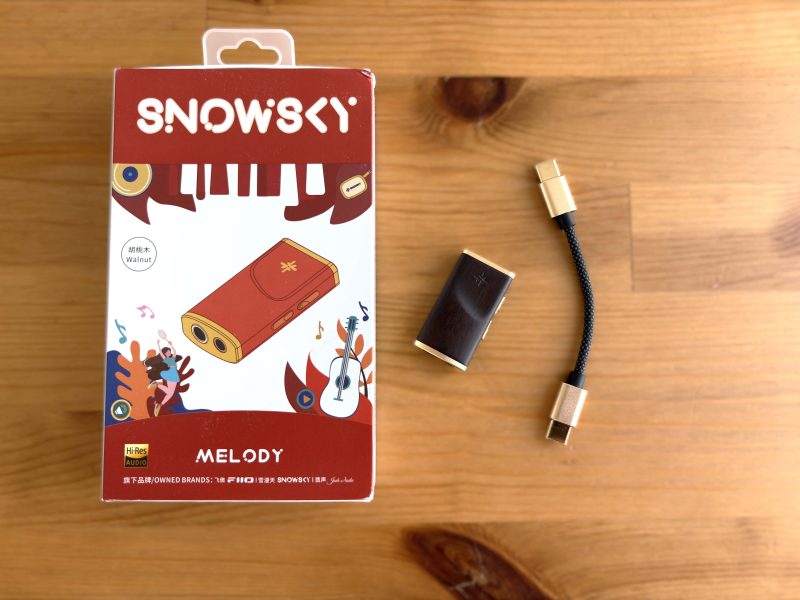
Disclosure: I’d like to thank FiiO for providing me with the Snowsky Melody for this review. All thoughts and opinions are my own, and FiiO had no say or input on the contents of this review.
The Snowsky Melody is the latest product from FiiO’s sub-brand. It’s a very compact portable DAC/Amp (or dongle DAC) with a wood housing, PEQ support, 3.5mm SE and 4.4mm balanced connections, and enough output power to drive most IEMs and low to mid-range headphones.
It’s priced between FiiO’s KA11 and KA13 dongle USB DACs at $39 USD, and differentiates itself with its unique wood and gold aesthetic. For a dongle DAC at this price, the Melody has a lot going for it in terms of features and compatibility. So let’s get into it and see if it could be the right product for you.
Key Specifications
- Product Page: https://www.fiio.com/melody
- MSRP: $39.99 USD
- DAC Components: 2x Cirrus Logic CS43131
- Connectivity:
- Unbalanced output: 3.5mm (100mW @ 32Ω)
- Balanced output: 4.4mm (250mW @ 32Ω)
- Input: USB-C
- Supported Sample Rates and Formats:
- Up to 32bit 384kHz PCM
- DSD256
- Features:
- Configuration through FiiO Control app
- 10-band PEQ
- Toggle for UAC 1.0 mode
- 2 power modes
- SPDIF and coaxial output support with 3.5mm connection
- Supports in-line controls and mic
- Supported Platforms:
- Windows
- macOS
- Android
- iOS
- Video game consoles (UAC 1.0 mode)
- Case and Dimensions:
- 42 x 22.5 x 11.5 mm
- Weight: 10g
In the Box

- SnowSky Melody
- USB-C to USB-C cable
- Warranty
Design & Build Quality

This is the walnut version of the Snowsky Melody (it also comes in a Maple version), but I have to say the walnut color with the gold accents gives the Melody a very luxurious and premium look. The wood housing allows it to be very light, yet feel solid and extremely well built. It’s strangely off-putting from the all-metal or plastic dongle DACs that are on the market, as the wood finish can give you a hollow feeling, but it’s also refreshing to see something different. The rounded shape gives the Melody a nice feel when in your hand, too.


There’s not much in terms of buttons and I/O. On one end is the USB-C connection, and on the other are the 3.5mm SE and 4.4mm balanced connections. Then, on one side are two buttons. The button closest to the outputs is used for volume down and next track, and the other button is used for volume up and previous track. It also has an RGB indicator light to indicate power states and USB decoding formats.

The included USB-C to USB-C cable is actually very nice. It has gold ends to match the color scheme of the Melody, and the cable itself is braided and sturdy, with a nice texture to it.


FiiO also sells a protective PU-leather case for the Snowsky Melody. I have the brown version, but it also comes in green. It fits snugly and feels very nice, with a cutout for the RGB light and indicators for the buttons. I appreciate that the case actually shows the + and – indicators for the buttons, which makes it easier to remember their function.


Features

What really makes the Snowsky Melody stand out, especially at this price point, are its features. Utilizing the FiiO Control app, you have access to a variety of features and settings. I should note that currently, only the Android FiiO Control app is supported in making any of these changes.

First up is the UAC mode. You have the ability to switch between UAC 2.0 (the default setting) and UAC 1.0 mode. UAC 1.0 is used for compatibility with devices such as the PS5 and Nintendo Switch.
The Melody also has two gain modes: Low gain and High gain. To be honest, I noticed a very small difference between the two, so I mainly left it in High gain mode.
HID button mode refers to the button configuration. In mode A, short-press each button for volume controls, and long-press for next/previous track controls. Mode B simply reverses this, so a short press will control next/previous tracks, and a long press will be used for volume control.
There is also the ability to completely disable the RGB light, as well as enable or disable in-line microphone support.


The EQ section features a 10-band PEQ, with three custom slots and several built-in profiles. I really like this feature as it’s nearly impossible for me to listen to my Audeze LCD-2 without using an EQ profile.


The Audio section has the toggle for enabling or disabling SPDIF support through the 3.5mm connection.
There’s also a very nice feature to disable DRE, or Dynamic Range Enhancement. If you’ve been following the discussion around the “Cirrus hump” that affects Cirrus Logic CS431xx DAC chips, then you know that the DRE feature can, in some cases, create slightly audible distortion with some audio signals. FiiO has given us the ability to simply turn this feature on or off, and that is greatly appreciated (a firmware update is required, so your Melody needs to be at V1.1.0 to have this).
Next is the DAC Work mode. Class AB uses slightly more power, and class H uses slightly less. I found no audible difference between the two modes, though class H is supposedly meant for lower power devices. I would leave this on Class AB for best performance.
Now, one feature I really appreciate is the Volume Control mode. This allows you to choose between 60 total volume steps or 120 total volume steps, so it really depends much fine-grained control you want over the volume. I wish more products offered this as an option.
Audio is simply the volume level, and there is a Channel balance section that allows you to manipulate the L/R balance.
Lastly is the Filter selection. You have a choice between the following digital filters: minimum phase fast roll-off, linear phase fast roll-off, minimum phase slow roll-off, linear phase slow roll-off, and a non-oversampling filter.
Within the FiiO Control app is also the Guide for the Snowsky Melody, which is a nice touch so you don’t have to go hunt down the manual to figure out a setting.


Sound Quality
Sources used for this review:
- Windows 11 desktop PC
- Microsoft Surface Laptop 7
- Sony NW-A306
- Apple iPhone 16
- Samsung Galaxy Z Fold 7
Headphones used for this review:
- Sennheiser HD 620S
- Sennheiser HD 660S2
- Audeze LCD-2
- Beyerdynamic DT 770 Pro 80 ohm
- HIFIMAN Sundara
IEMs used for this review:
- 64 Audio Solo
- ZiiGaat Crescent
- 7Hz Timeless II
- Simgot EA1000 Fermat
- JUZEAR x Z Reviews Defiant
Links to my music playlist used for the majority of testing:
Spotify: https://open.spotify.com/playlist/6QSIhuCBDAUyoWGcyxPeN8?si=c0a4eb6bd3e3421e
Apple Music: https://music.apple.com/ca/playlist/hifi-oasis-audio-testing/pl.u-lKWlcjy04xp
Tidal: https://tidal.com/playlist/503485c7-7f3d-43f0-b904-4b9a89c33875

The Snowsky Melody uses 2x Cirrus Logic CS43131 DAC chips, with the ability to output 100mW at 32 ohms for the 3.5mm SE connection, and 250mW at 32 ohms for the 4.4mm balanced connection. Along with that, it supports PCM playback up to 32-bit/384kHz and DSD support for up to DSD256.
The output power might sound low, but in reality, it’s very decent for a dongle DAC at this price and size. It’s very close to iFi’s GO Link Max, for example, and even beats out the Snowsky Retro Nano and FiiO BTR13 when it comes to output power with the balanced connection.
In terms of actual sound quality, it’s very good. I’d classify it as neutral-sounding, clean, and technical. There isn’t any coloration present, which makes sense since that’s not what you want a DAC to do anyway. It sounds exactly like most other dongle DACs with this chipset and for this price, which is to say very good.
I tested with and without DRE enabled, and personally didn’t find much of a sound difference, and did not hear any distortion with my test tracks.
I really appreciated that this would drive anything I threw at it. For IEMs, there’s no background hiss or noise, even when using the 64 Audio Solo. The ZiiGaat Crescent and 7Hz Timeless II both sounded perfect, as did my favorite IEM, the Simgot EA1000 Fermat.
With regards to headphones, it performed perfectly fine with my Sennheiser HD 620S and HD 660S2, as well as the HD 550. Even my Beyerdynamic DT 770 Pro 80 ohm had no issues. What about Planar headphones? Both my Audeze LCD-2 and HIFIMAN Sundara sounded like they usually do with my desktop DAC, so the Melody has no issues here either.
Final Thoughts

The Snowsky Melody is an extremely competent dongle DAC that costs $39 USD and can drive anything from sensitive IEMs to mid-range headphones. On top of that, it has PEQ support, low power draw, and excellent app support. It’s seriously a bargain at this price, so if you’re in the market for a reasonably priced USB dongle DAC, I can’t think of any reason not to consider the Snowsky Melody.


Buy from Amazon: https://amzn.to/3VAjPQB
Alternate Amazon Link: https://geni.us/8eVexgC
Buy from AliExpress: https://s.click.aliexpress.com/e/_oFU3dY3
The above links may be affiliate links. All commission earned through them goes directly to maintaining this site and bringing you more audio reviews.
I’m not always able to cover all the details of a product, both hardware and software, in our reviews. If you have any specific questions about this product, please feel free to leave a comment or contact me directly.
Be sure to check out our excellent Buyer’s Guides, as well as our other Reviews.
HiFi Oasis Verdict
HiFi Oasis Verdict-
Design & Build Quality8/10 Very good
-
Sound8/10 Very good
-
Features/Accessories8/10 Very good
-
Value9/10 Amazing
Pros
- Wood-shell design looks and feels unique
- Excellent sound quality
- No background noise or hiss when using sensitive IEMs
- PEQ support
- Can enable or disable DRE
- Included USB-C cable looks and feels high quality
- Can drive most IEMs and mid-range headphones
Cons
- The leather case should have been included (or even a fabric pouch)
- Not much volume overhead for harder to drive headphones


