




Disclosure: I’d like to thank SteelSeries for providing me with the Arctis Nova Elite for this review. All thoughts and opinions are my own, and SteelSeries had no say or input on the contents of this review.
When I reviewed the SteelSeries Arctis Nova Pro Wireless headset last year, I started off my review by saying that it “is not just a gaming headset, but something more. You could even say it’s a new category of headset, a gaming lifestyle headset”. Well, I guess I have to come up with a new category now, too, since today I am looking at the SteelSeries Arctis Nova Elite, and I have many, many thoughts on it.
The Arctis Nova Elite is still a wireless gaming headset using the same general design language as the Arctis Nova Pro. But we have some fairly large differences, both inside and out. The Nova Elite uses 40mm Carbon Fiber drivers instead of Neodymium, metal hinges instead of plastic, the addition of a built-in microphone to complement the retractable boom mic, and Bluetooth 5.3 with LC3 and LC3+ (Bluetooth LE) support and improved active noise cancellation (ANC). The 2.4GHz wireless connection and GameHub also get an upgrade to now support audio sample rates up to 24-bit/96kHz, meaning this headset is no longer geared towards just gaming and lifestyle, but now enters the audiophile territory.
The one final, important change is that there are no longer separate models that depend on which game system you will use. Every Nova Elite will work with every game system, and the GameHub now has support for up to 3 USB inputs, with one of them supporting Xbox consoles. SteelSeries calls this “OmniPlay” and allows you to mix the sound from multiple inputs together. I will, of course, be putting this to the test.
As a gamer, as someone who likes to listen to music when I travel or commute, and as an audiophile who appreciates critical listening, there are many things about the Nova Elite that pique my interest. So, because of that, and since there is a lot to talk about, this is how this review will go. I will, of course, go through things such as the design, comfort, and build quality of the headset and GameHub. I’ll talk about the ANC and Transparency modes, as well as the various ways to connect the Nova Elite. We’ll get into the battery performance and go through the GameHub settings and how it works. We’ll look at the integration with the SteelSeries GG software, Sonar settings, and the Arctis mobile app, the usability and overall experience, and finally the sound quality. There’s a lot to cover, so let’s get into it.
Key Specifications
- Product Page: https://steelseries.com/gaming-headsets/arctis-nova-elite?color=sage-and-gold
- MSRP: $599 USD, €649
- Battery Life: Up to 30 hours of audio playback per battery
- Battery Capacity: Two swappable 700 mAh batteries
- Type: Over-ear, closed-back
- Driver Type: 40mm Carbon Fiber driver
- Impedance: 38 Ohms
- Sensitivity: 101 dBSPL @ 1kHz/1mW
- Weight: 380g
- Connections: 2.4GHz wireless with base station, Bluetooth 5.3, 3.5mm connection, USB-C port (charging only)
- Audio Format Support: Up to 24-bit/96kHz (when using the 2.4GHz wireless connection)
- Bluetooth Codec support: SBC, LC3, LC3+
- Microphone: Yes, 2 total (one retractable boom mic, one on-ear microphone)
- Active Noise Cancellation (ANC): Yes
- Charging Method: USB-C, base station
- Weather/Dust Resistance: None
In the Box and Unboxing
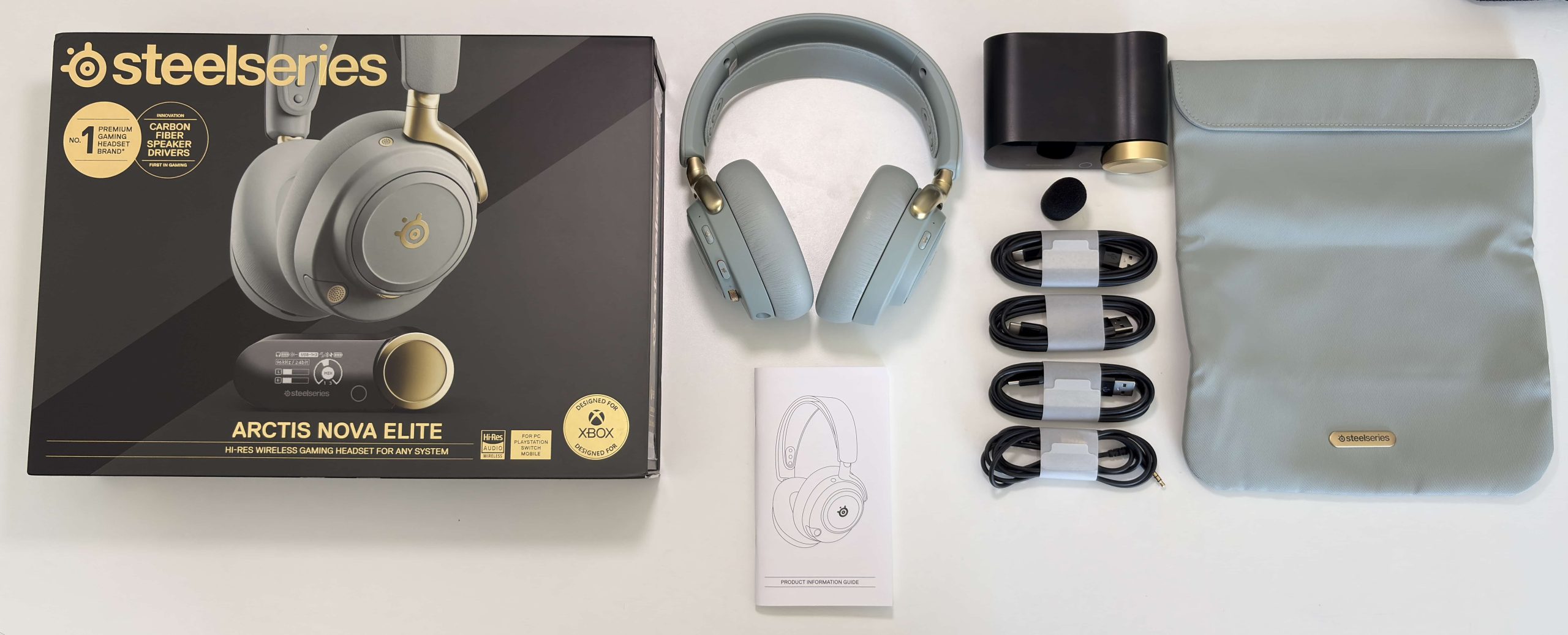
- Arctis Nova Elite
- Travel pouch
- Wireless GameHub
- Two battery packs
- Three USB-C to USB-A cables (1.5m length)
- 3.5mm 5-pole to 3.5mm 4-pole cable (1.2m length)
- Microphone pop filter
- Manual


SteelSeries gives you everything you need to effectively use and enjoy the Arctis Nova Elite. There are more than enough cables included to connect to your PC and various game consoles. Most notably, though, is the very stylish and useful travel pouch, which is soft enough to fit into your bag but durable enough to protect the headset. It’s very well made, and it’s a nice touch to include this. If you want a more durable case, SteelSeries does sell a hard shell case to fit the headset (see below).


Design & Comfort
Headset

SteelSeries has taken an iterative approach to its headsets. They use the same overall design language for them while making small tweaks based on feedback. With the Nova Elite, the earcup hinges are now metal, as is the volume wheel. The headband is also no longer an exposed metal band but is now covered in a leatherette material, which makes it much more pleasant to handle. The earpads have also been upgraded and have a more plush memory foam-like quality to them.
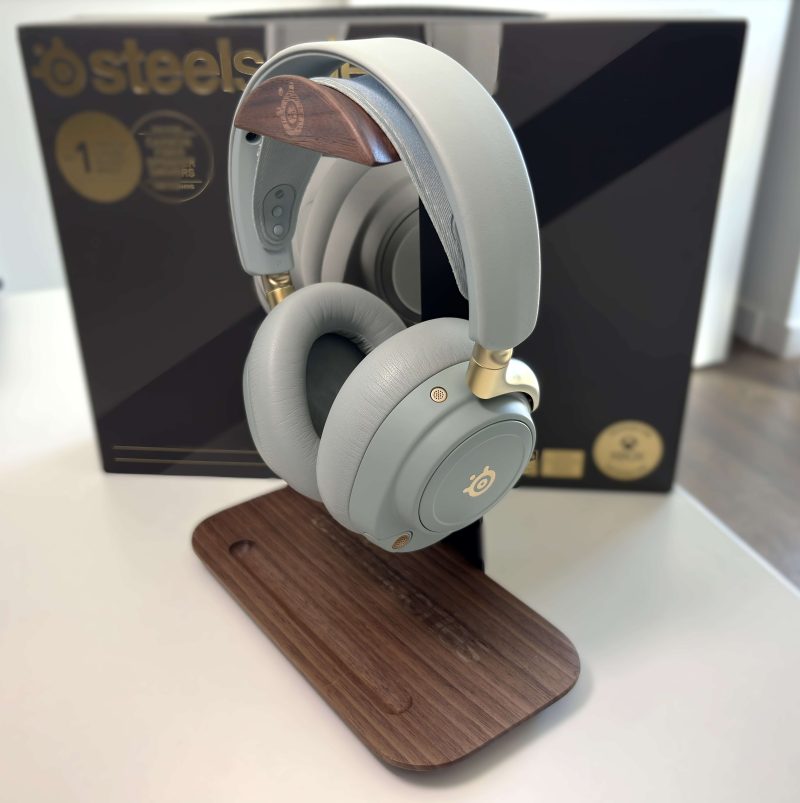
Before getting into the comfort and how it feels to wear them, let’s take a moment to talk about the color. The Nova Elite comes in Obsidian (black) or Sage and Gold, which is what I have here. I really wasn’t sure how I would feel about this color choice in person, but I also had the same reservations about the white Nova Pro Wireless, which I ended up loving so much that it became my daily gaming and video call headset.


The sage color of the Nova Elite is subtle and calming, not too saturated but still striking. It’s less flashy than white, but I think it still carries some sharpness to it. The gold accents of the hinges, buttons, microphone, and SteelSeries logos help the Nova Elite look more like a luxury product than one intended for gaming. I would urge you to check it out in person, as I think pictures do not do it justice. That said, if Sage and Gold aren’t your thing, Obsidian will offer you an understated and more serious look. After some time with the Nova Elite, though, I have become pretty much sold on the color scheme, and to me it’s comparable to wearing something like the DALI IO-8. It looks and feels just as luxurious.
Speaking of feeling, how does the Arctis Nova Elite feel when wearing it? Well, the Nova Pro Wireless was already an extremely comfortable headphone to wear, and the Nova Elite simply improves upon this as it uses the same ComfortMAX System. The design is essentially the same, but the leatherette earpads get a big upgrade. They feel very soft and are plushier, as well as a little roomier, than the Nova Pro. There’s enough depth in the earcup that my ear is not touching the driver, and the earcups are tall and wide enough that my ears have enough room to breathe.

The plushier earpads mean better long-term comfort as they can compress a bit more without affecting how they sit around your ears. They also offer excellent passive noise isolation, even for someone like me who wears glasses. One thing I noticed right away, too, was how smooth the sliders are for adjusting the earcups. They have an almost hydraulic-like feeling now that results in a smooth yet firm adjustment. The elastic headband remains the same as on the Nova Pro Wireless, and is adjustable using the notches on each side of the band.

The earpads can be easily removed and replaced if needed. Taking them off reveals the carbon driver used in the Nova Elite. The earcups can also be swivelled towards you so that the headset can lie flat, which makes it great for travelling, especially with the included travel bag mentioned earlier.


The connections on the headset remain the exact same. The right earcup holds the swappable battery back underneath the magnetic speaker plate, as well as the Bluetooth pairing and playback button on the back side of the earcup. The only new addition here is the on-ear microphone, which is located on the front.


The left earcup has a USB-C connector underneath the magnetic speaker plate that is used for charging only. On the back side of the earcups is the power button, mute button, and volume wheel. The 3.5mm connector is located on the very bottom, and the front of the earcup houses the retractable boom microphone.
Here are a couple of pictures of the Arctis Nova Pro Wireless and Arctis Nova Elite side by side:


GameHub

The design of the wireless GameHub is essentially the exact same as the previous iteration. The front of the GameHub features an OLED display, a capacitive touch button on the bottom right, and a large aluminum volume knob/control wheel. The sage and gold version of the Nova Elite has the control wheel in a gold color, while the obsidian version’s is black to match the headset.


The right side still houses the battery pack charging slot.
The back has a 3.5mm Line In and a 3.5mm Line Out connection. Next are three USB-C ports labeled USB 1, USB 2, and USB 3/Xbox.

ANC and Transparency Modes

The SteelSeries Nova Elite features active noise cancellation and transparency modes, which are still not commonly featured on gaming headsets. While the Nova Elite has excellent passive noise isolation to block out noise, you can still hear things like keyboard and mouse clicks, computer fans, traffic noise, and sirens. Enabling ANC greatly reduces the amount of noise you hear, though.
My gaming PC sits on my desk to the right of me, and while gaming, I like to run the fans at higher RPMs to try and get the best temperatures and performance possible, but this has the added effect of distracting me while playing games and therefore pulling me out of the immersion. With ANC enabled, most of that is gone, and I can’t hear my PC fans at all. Maybe if I strain, I’ll hear a low hum, but really, that sound effectively gets blocked out.
Keyboard and mouse click noise are also greatly reduced, and the shrillness that you would normally hear is more like a soft thud. As someone who lives downtown in a busy city, I typically have my window open in my office, which unfortunately lets in traffic noise, sirens, and construction noise. Once again, all those sounds are greatly reduced and become distant background noise. The Nova Elite cannot compete with dedicated noise-cancelling headphones from Sony, Bose, or Apple, but they honestly do a great job at reducing ambient noise enough so you can concentrate on gaming.
The transparency mode works really well, in my opinion. I typically like to have this enabled for video calls so I can hear myself talking, as well, so I don’t feel stuck inside my own head. It did a good job too when I took my dog for a walk outside and had to pay attention to cyclists, turning cars, and barking dogs.
The ANC and Transparency modes can be adjusted, being stronger or weaker depending on your needs or situation. This is done with either the SteelSeries GG app or the Arctis mobile app.
Turning on and switching between the various modes is also very easy. When the headset is powered on, pressing the power button once will enable ANC, and pressing it again will turn it off. Pressing the power button twice will switch to Transparency mode, and from there pressing the power button once will switch you to ANC, and pressing twice will turn Noise Control off.
Connectivity Options
The SteelSeries Nova Elite has three ways to connect to your devices.:
- Wirelessly via the GameHub
- Bluetooth (SBC, LC3, LC3+)
- 3.5mm single-ended cable
The wireless method uses a 2.4GHz wireless connection to the GameHub and is the most convenient and effective. There is essentially no perceptible latency despite being a wireless connection, and the GameHub has been upgraded so that you can get a sample rate of up to 24-bit/96KHz, which is great news for audiophiles. The wireless connection is absolutely stable, and I have never had any issues with dropouts or audio cutting out, even when walking all the way across my apartment from the office to the kitchen, which is about 15 meters with two walls between me and the GameHub.
The Bluetooth connection has been upgraded on the Nova Elite from 5.0 to 5.3, and supports the LC3 and LC3+ Bluetooth LE codecs, on top of the basic SBC codec. I have to say I’m still a little disappointed here, and was hoping for at least AAC and aptX codec support. It’s a bit less of an issue since the LC3 codec performs much better than SBC and has excellent low-latency performance as well, but still, one can dream.
The LC3 codec actually works extremely well. Using it with both my Samsung Galaxy Fold 7 and my Surface Laptop 7, I was able to watch videos and have almost no noticeable latency, but still great sound quality. I wasn’t able to test LC3+ as support is extremely low for it right now, but the option is there at least for the future. LC3+ has a much higher bitrate and bit-depth support than LC3, so it will be exciting to test its audio performance once it is more widely supported. There’s also MultiPoint support that allows you to maintain a Bluetooth connection with multiple devices. The Bluetooth button also acts as a playback control button. One press for play/pause, two presses for next track, and three presses for previous track.
The wired 3.5mm connection works exactly as you expect, with even support for the microphone when used with the included cable (or any TRSS cable). The one downside with this connection is that you cannot turn the headset on, so no EQ profile support or access to ANC and Transparency modes.
Battery Performance
The SteelSeries Nova Elite has the “Infinity Power System”, which is essentially the ability to hot swap between two battery packs. One battery pack sits inside the GameHub where it is charged, and the second sits inside the right earcup, behind the magnetic plate. Once your battery runs low, you simply swap between the packs, and in this way, you always have a fully charged pack to change to.
SteelSeries promises up to 30 hours of audio playtime per battery pack, and I can confirm this is actually accurate. Even when using the microphone quite a bit, I was getting just under 30 hours before the battery was down to 2%. A full charge takes approximately 3 hours, and 15 minutes of charging gives you about 4 hours of playback time.
GameHub Operation and Settings

The wireless GameHub is essentially the DAC for the Arctis Nova Elite, as that is what the headset wirelessly connects to. The majority of settings can be changed or configured using either the buttons on the GameHub or through the SteelSeries GG software. The Home screen has various display modes to choose from, but the one I like the most is the Detailed Stereo mode, as it displays the bit depth and sample rate, volume, and the left and right audio levels when audio is being played.
Pressing the volume wheel in on either the GameHub or the headset allows you to adjust the ChatMix, which is the volume level between the game audio and voice audio. If you have multiple devices connected via USB, pressing the wheel in again will bring up the mix between the two selected USB inputs (more on this in the Usability section). Holding the volume wheel in for two seconds enters the menu system of the GameHub. Turn the volume wheel cycle through the options, pressing it in is selects the displayed option, and the capacitive button to the left of the wheel is used as the back button.
SteelSeries GG, Sonar, and Arctis app
What makes SteelSeries’ headsets so powerful is their integration with the SteelSeries GG software, which includes the powerful EQ suite Sonar. SteelSeries GG is available for Windows 10, Windows 11, and macOS. I used it mainly with Windows 11, but did briefly try it on my M1 Mac Mini, and it worked just fine.
For my review, I’ll be focusing on the Engine and Sonar sections of GG as these sections directly relate to the Nova Elite headset; diving into the other sections would be a whole other post in itself.

The Engine tab shows the Arctis Nova Elite, which has the current battery level of the battery pack that is in the GameHub, as well as the battery level of the headset. All firmware updates are done from within this section as well. Clicking on the Nova Elite brings us to a screen where we can change audio options, microphone options, and settings for both the headset and the GameHub. All settings, such as the EQ presets, microphone presets, and volume settings, are stored on the headset itself, making it convenient to use the Nova Elite in Bluetooth mode and have your EQ preset already applied, or connecting the GameHub to a game console, knowing your EQ presets will already be there.

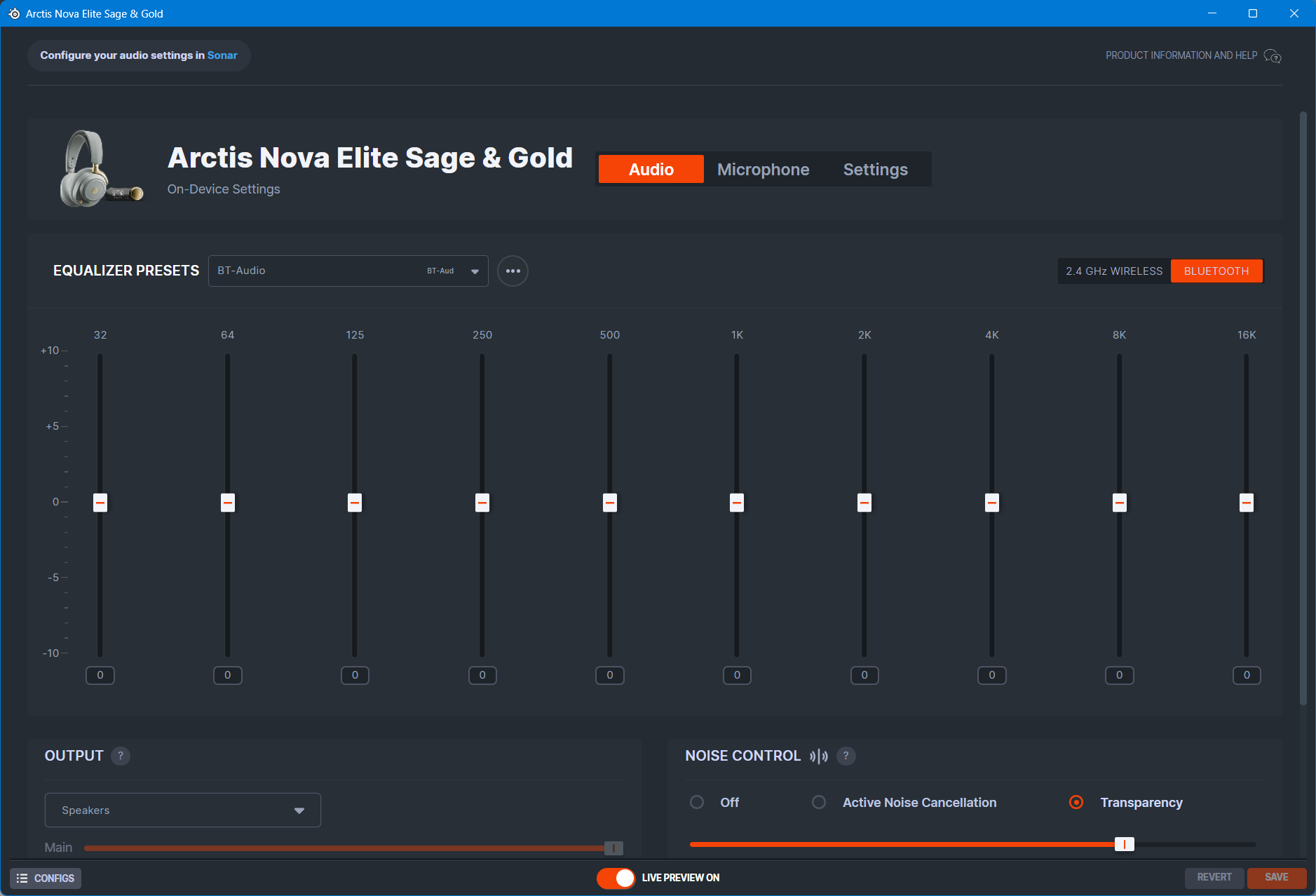


All of these settings can also be changed in the Arctis App for Android and iOS, which is extremely convenient for using in Bluetooth mode or with game consoles, as you can select your EQ presets on a per-game basis, and even adjust the ANC and transparency mode strength. The fact that you can use the app to change settings while the GameHub is connected to a console is massive, and I cannot overstate this.


Moving to Sonar now, this is where the magic happens. Once you connect the GameHub to your computer, I would urge you to go into the audio settings, find Headphones (Arctis Nova Elite), and make sure the Format is set to 24-bit/96KHz. This will ensure you are getting the highest audio quality possible.

Once that is done, and once you have enabled Sonar in SteelSeries GG, it will create various virtual audio devices. If you’ve never used GG before and this is all new to you, it can be a little overwhelming, and you may need to change up your workflow a bit to accommodate how Sonar works. But trust me, it is worth the growing pains to learn it.


Sonar gives you various audio channels: Game, Chat, Media, Aux, and Mic. It allows you to route various apps to each channel depending on the experience you want to have. As well, the Game, Media, and Aux channels are presented to Windows as 8-channel, 24-bit/96kHz audio devices, with the Chat channel showing as a 2-channel, 24-bit/48kHz audio device. The Mic channel is for the microphone, and is a 2-channel, 24-bit/48kHz audio input device. All of the above channels have access to a 10-band parametric EQ (PEQ), with each channel having many built-in presets specifically for that channel’s intended purpose. Some examples are below:
The SteelSeries GG software, or even Sonar, could be a whole article unto itself with the amount of features and capabilities that are available here, so if that’s something you’d want to see, please let me know in the comments at the end of the review.
Usability and Experience

Holding the power button on the Arctis Nova Elite for a couple of seconds powers it on, and it connects within moments to the GameHub. The audible sounds used to indicate power and pairing status are clear and unobtrusive. If you’ve used the Arctis GameBuds before, they have extremely similar sound effects. When you press the power button once, you are greeted with a lovely female voice saying “ANC” to indicate that ANC is on, and if you press the button again, the voice says “ANC off”. Double-pressing the power button, you are greeted with a voice saying “Transparency”. I do appreciate how clear this is, especially compared to the Arctis Nova Pro Wireless, which only had sound effects for all of these operations.
You can change volume using either the control wheel on the GameHub or the volume wheel on the headset. I do need to take a moment to say how superbly designed it is and how much of a joy it is to use. It has more resistance than the one on the Nova Pro Wireless, and the rougher texture of the wheel makes it much easier to grip with your thumb and adjust the volume. The mute button that sits just above it is conveniently located and controls the mute status for both microphones. The retractable boom mic has a fairly prominent red LED light at the end of it when it is muted, so it’s easy to see at a glance instead of having to feel for the position of the mute button. The boom microphone is also easier to take out and put back into the headset. It feels like SteelSeries has greatly refined the experience, so it’s effortless to do.

Speaking of microphones, what is really unique about the two microphones on the Nova Elite is how they operate. When the boom mic is retracted, the on-ear microphone is enabled, and when the boom mic is taken out, the on-ear mic is disabled. You can even switch between them as you are talking to someone, either wirelessly through the GameHub or via Bluetooth, which is a pretty amazing feat. This opens up options for being able to use the Nova Elite in public and to be able to handle voice calls without taking the boom mic out. Kudos to you if you were comfortable doing that with the Nova Pro Wireless, but I was not, so the inclusion of the on-ear mic is huge, in my opinion.
One of the biggest features of the Arctis Nova Elite is “OmniPlay”. This allows you to not only connect multiple devices to the GameHub, it also allows you to mix the audio sources together. So, in my setup on my desk, I have the GameHub connected to my PC in USB 1. I have my Nintendo Switch 2, also on my desk, connected to USB 2. I also have my FiiO M21 digital audio player (DAP) connected to USB 3 since it allows for USB audio out. I also have Bluetooth enabled on the Nova Elite and paired to my Samsung Galaxy Fold 7. While I’m on my PC, I have the audio from various applications, such as Microsoft Teams, Outlook meeting notifications, and even YouTube playing in the background. At the same time, I can have music playing from my FiiO M21 DAP. Pressing the volume wheel on the headset, or the control knob on the GameHub, I can adjust the sound level between my PC and the FiiO M21, depending if I want to focus on listening to music, or just have it quietly playing in the background. Also at the same time, I have audio from my Galaxy Fold 7 since it’s connected via Bluetooth. Phone calls, messages, and other notifications can be heard on top of what is already playing from my PC and my DAP. This sounds like insanity, but actually, it’s pretty neat how it can all work together, and you can adjust it based on your workflow.

If I want to play my Switch 2, I’m obviously not using my PC, but if I set the audio mixing to the USB 1 and USB 2 ports, then I can still hear notifications on my PC while playing my docked Switch 2. This is great if you just want some music or YouTube playing in the background, or if you are in a voice chat on Discord with some friends. I think the possibilities with the OmniPlay system are pretty endless, and it’s honestly one of the best features of the GameHub.
I typically play games on my PC, but I also play on my PlayStation 5, and Nintendo Switch 2 (RIP my OG launch day Switch that died during the process of making this review). With the Nova Pro Wireless, you didn’t have any way to access EQ profiles or adjust any headset settings when in Bluetooth mode, or when using it with a game console. That has now changed since the Arctis Nova Elite is now supported by the Arctis mobile app. This is huge for me since I do like to change EQ profiles based on the game I am playing, and having to use a PC to always manage or tweak something was a massive pain. Now, if you want to change EQ profiles, pair your headset to your phone or tablet, load up the Arctis app, and you can now change the EQ profiles, whether they are custom ones you made or the built-in Sonar presets. As discussed in a previous section, you can also change the ANC and transparency mode strength from here, as well as adjust the microphone settings.
I could go on, as there’s so much that is packed into the GameHub and Nova Elite headset, but I think I’ve conveyed the overall experience. From a user experience perspective, I think SteelSeries has taken massive strides to improve the overall experience of using and enjoying the Nova Elite over the Nova Pro Wireless. It’s such a joy to use.
Sound Quality
Sources used for this review:
- Windows 11 PC
- M1 Mac Mini
- Nintendo Switch 2
- PlayStation 5
- FiiO M21
- Samsung Galaxy Fold 7 (Bluetooth, LC3)
- Apple iPhone 16 (Bluetooth)
- Sennheiser BTD 700 (Bluetooth, LC3)
Links to my music playlist used for the majority of testing:
Spotify: https://open.spotify.com/playlist/6QSIhuCBDAUyoWGcyxPeN8?si=c0a4eb6bd3e3421e
Apple Music: https://music.apple.com/ca/playlist/hifi-oasis-audio-testing/pl.u-lKWlcjy04xp
Tidal: https://tidal.com/playlist/503485c7-7f3d-43f0-b904-4b9a89c33875

The SteelSeries Arctis Nova Elite headset uses a custom-designed 40mm Carbon Fiber drive. It’s a two-piece driver that should allow for a clearer and cleaner sound with less distortion. Without spoiling my audio impressions in the following section, this actually is the case. The general sound profile of the Nova Elite is neutral leaning, though vocals and instruments like guitars are clear and slightly forward, so there might be a slight bump in the midrange and treble to help bring out that clarity and detail.
This headset is also unique in that it has three ways for you to connect to a source to play audio. For my purposes, I mostly listened and used the Nova Elite while it was connected to the GameHub via the 2.4GHz connection. The difference between the 3.5mm cable connection and the 2.4GHz wireless connection is indistinguishable to me, and also, you cannot use the ANC and Transparency modes, or EQ profiles with the 3.5mm connection as the headset will turn off once the cable is inserted (huge bummer here, honestly), so for the best stationary experience, use the 2.4GHz connection.
Alright, let’s get into the sound impressions.
Music
The default sound without any EQ is more neutral-leaning, but emphasises clarity and detail. The Nova Pro Wireless did as well, but it was lacking in vocals and bass. The Arctis Nova Elite, well, does not. Bass has a very nice sub-bass rumble and mid-bass thump. If you are used to elevated bass, such as what you get with most ANC headphones, you’ll be disappointed here, but obviously, you can boost the bass through EQ to regain that. For me, from an audiophile standpoint, the bass is tasteful and allows me to listen critically.
The midrange sounds mostly flat but starts to get some elevation in the upper midrange, which brings out some detail in guitars and vocals, especially female vocals. Male vocals sound good thanks to the bass performance, and from an audiophile listening perspective, this is exactly what I like to have.
The treble is slightly elevated to help bring some crispness and detail to the sound, and complements the bass tuning very nicely. The Nova Elite is not a bright headset, but if you’re very treble sensitive, then you might find these a touch too sibilant without any EQ.
The sound profile of the Nova Elite is very nicely balanced so that every music genre sounds great. It won’t blow you away, but it’s not trying to do that. It’s very politely tuned and responds well to EQ, so you have a lot of potential to unlock if the default sound doesn’t quite suit your taste. For a gaming headset, these sound phenomenal for music.
Gaming
Obviously, if you’re buying a gaming headset, it needs to sound good for gaming. What that means is you need a balanced sound that also has an openness for certain games and an immersive quality for others. It’s a delicate balancing act. Thankfully, the Nova Elite sounds great overall using the flat EQ profile. You can use it for any game, and they all will sound good, at least to my ears they did. The real potential, though, is with Sonar.
Using Sonar in the SteelSeries GG software, you can use one of the many presets to shape the sound, making it more suitable for certain games. For example, the PUBG preset brings up the midrange and upper treble, but has a dip around 3700Hz so that gunshots don’t pierce your ears.
The COD Warzone presets bring up the bass around 100Hz to emphasize footsteps, making them easier to hear. You can, of course, create your own, too, but I mainly enjoyed using either no EQ or one of the existing presets. These games still sound excellent without EQ, but in my opinion, you’re missing the potential if you don’t at least try it.
You can also tune the spatial audio settings in Sonar, and when you do this, you really get a sense that the Nova Elite was made for it. Competitive games like Warzone and PUBG have a lot of verticality to them, and are great examples of how much spatial audio can impact your gaming performance. In both games, the spatial sound really comes through and helps you to identify where gunshots are coming from, where footsteps are, and where packages are being dropped.
Games like Cyberpunk 2077 that use Dolby Atmos audio also sound excellent, and Atmos is fully supported with the Nova Elite as well. Actually, that game really sounds good with the Nova Elite. Traffic sounds, background chatter of various NPCs, and the general atmosphere of the game world all come through with clarity and help to immerse you in the world.
Imaging and Soundstage
The Arctis Nova Elite performs very well here. Left and right are easily distinguishable as sounds moving between them can be readily identified. This helps a lot of audio cues in games, but also with instrument placement in music, especially live tracks.
The Soundstage sounds fairly open for a closed-back headset. Good width and height, and great depth, meaning audio won’t sound too close to you. The only headphone that I have heard that has a bigger soundstage is the Sennheiser HD620S, but just by a bit.
Microphone Performance
SteelSeries has been known for excellent microphone performance with their headsets, and the Nova Elite is no exception. It uses the ClearCast Gen 2 bi-directional boom mic, as well as an on-ear omnidirectional microphone. Both microphones have built-in AI Noise rejection technology, but when used with Sonar, you get access to ClearCast AI Noise Cancellation, which has adjustable levels.
The boom mic sounds excellent, and I commonly use it for video calls and Discord chats. I would go as far as saying that it’s as good as Nvidia Broadcast’s noise removal features. The on-ear mic also sounds pretty good, which I did not expect. It tends to pick up more background noise since it’s omnidirectional, but short of car horns and construction noise, it was able to pick up my voice with ease and allowed me to make many phone calls while walking around my apartment, and even outside.
Final Thoughts

The SteelSeries Arctis Nova Elite is the ultimate gaming headset. It’s also a great ANC headphone. It’s also a great critical listening headphone. I do not know what category to put this headset in now, so let’s just say that it is one of the first headsets to cross so many boundaries. I guess you could say it’s intended for the luxury audiophile gamer. Someone who wants to be able to have a great gaming experience with the multiple game systems they own, as well as be able to listen to their music collection in high-res. And on top of that, to be able to listen to the Nova Elite on the go with the benefit of ANC and good enough Bluetooth support. The fact that the headset also looks like a stunning luxury item also helps build the narrative here.
The Arctis Nova Elite does a great many things right, but it does fall short in some places. For one, if you found the Nova Pro Wireless too heavy, then these won’t change your mind since they are slightly heavier. As well, not being able to use the Noise Control features, or onboard PEQ, with a 3.5mm wired connection is a bit of a disappointment. The Bluetooth codec support being limited to the SBC, LC3, and LC3+ codecs will probably deter the most critical of audiophiles from even considering the Nova Elite. And finally, there is the price. $599 USD is in the territory of mid to high-end audiophile headphones, and in some cases, it’s more expensive than many high-end ANC headphones that will give superior ANC and Transparency performance.
All this being said, the SteelSeries Nova Elite is the closest I have seen to being that all-in-one headset that the luxury audiophile gamer is looking for. The OmniPlay system of mixing different audio sources has also become quite invaluable to me, and this greatly increases the value here. Add to the fact that now there is now only one version of the headset that works with every game system, “Elite” is certainly an accurate name for it. Thanks for reading this very long review, and I hope it helps you decide if the Arctis Nova Elite is right for you.

Buy from Amazon: https://amzn.to/474aAic
Check Price Online: https://geni.us/mbs9
Buy direct from SteelSeries: https://steelseries.com/gaming-headsets/arctis-nova-elite
The above links may be affiliate links. All commission earned through them goes directly to maintaining this site and bringing you more audio reviews.
I’m not always able to cover all the details of a product, both hardware and software, in our reviews. If you have any specific questions about this product, please feel free to leave a comment or contact me directly.
Be sure to check out our excellent Buyer’s Guides, as well as our other Reviews.
HiFi Oasis Verdict
HiFi Oasis Verdict-
Design & Comfort9/10 Amazing
-
Sound9/10 Amazing
-
Features/Accessories9/10 Amazing
-
Value7/10 Good
Pros
- Stellar sound quality that is suitable for gaming and music listening
- Excellent build quality, material used feel solid and luxurious
- Very comfortable for long term listening
- Wireless and Bluetooth range are fantastic and perform perfectly
- Sage and gold color scheme is very classy
- Long battery life, excellent battery swap system
- Multiple audio source mixing on the GameHub is a game changer
- Limitless audio possibilities with SteelSeries GG and Sonar
- Arctis mobile app is incredible useful, especially when using the Nova Elite with game consoles
- Microphone performance is simply excellent
- Inclusion of on-ear microphone
Cons
- Can't use Noise Control and onboard EQ with a 3.5mm wired connection
- Increased weight may put some users off
- Limited Bluetooth codec support
- High cost


